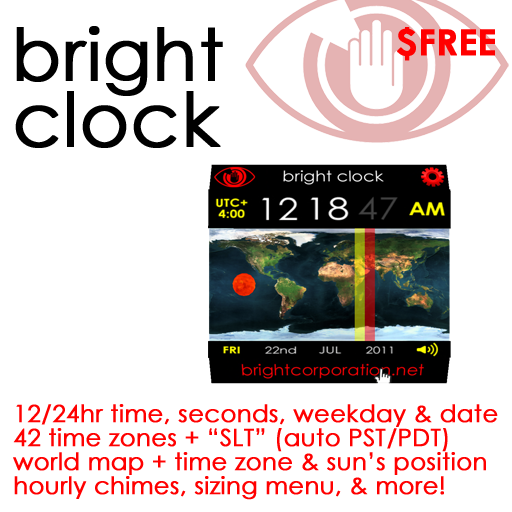
Digital 12/24hr clock, seconds/weekday/date, 42 time zones + SLT, and more!
The Bright Clock has a digital display showing the time (including seconds), weekday, and date: in Second Life, or anywhere in the world.
It displays the time zone 'offset' from UTC (Universal Time Coordinated, or GMT, Greenwich Mean Time), which can be set to any of 42 time zones around the world. If you are in Bombay, set this to UTC+05:30 for Indian Standard Time, or if in Berlin, to UTC+01:00 for Central European Time (and then to UTC+02:00 for Central European Summer Time).
The clock shows a world map, and a sun moving across it in real time. This is slightly simplified, as the earth's axis is not perpendicular to its plane of rotation about the sun, so the sun dips below and then above the equator. However, the east-west position is correct, and may help you visualise which half of the world is in daylight, and which in darkness.
Two bands also cross the map north-south, in red and yellow. Each is an hour wide (that is, it takes the sun an hour to cross them).
The red band shows the position of the selected time zone - where the sun will be when your clock shows midday. In theory, if all time zones lines were drawn straight between the poles, all clocks in the red band would show the same as yours. In reality, to avoid dividing national communities (forcing people to reset their watches as they cross a city), time zones are erratic. However, the red band is a strong visual clue: if you have rez two clocks, one showing the time in Brasilia, the other in Paris, the red bands make it obvious which is which.
The yellow band shows where clocks *would* show the same time as yours if they were on "Daylight Saving Time" (DST). Countries observing DST move their clocks forward an hour in spring, and back in autumn. For instance, during summer, London is on "British Summer Time": UTC+01:00. If you select this offset, the red band runs through central Europe while London is in the yellow band.
DST is not used everywhere, and where it is used - as in much of Europe and the Americas - adjustments are made on different dates in each place and in different places. As a result, the Bright Clock cannot allow for it automatically: to observe DST, you must set your offset back and forth manually - but this only takes a few clicks.
The only exception is in SLT. Second Life Time is not a real time zone. It is the local time at Linden Lab's offices in San Fransico: Pacific Standard Time (PST) in winter, and Pacific Daylight Time (PDT) in summer. If you select SLT, the Bright Clock will always reflect game time, even when it changes between PST and PDT.
Your clock can show 12 hour time, eg. 10:00PM, or 24 hour time, eg 22:00.
Optionally, the Bright Clock can play a brief "chime" sound every hour.
Just rez your clock and it will begin showing Second Life time.
Click the map (the body of the clock) to be told the time in various formats:
Bright Clock #011: The time is...
Clock time (SLT): 15:08:31 TUE 20th AUG
Second Life time: 15:08:31 TUE 20th AUG
World time (UTC/GMT): 22:08:31 TUE 20th AUG
Unix time: 1311113311
---
Thank you for using this Bright freebie:
Visit http://brightcorporation.net for more!
"Clock time" shows the time currently on the face of the clock.
"Second Life time" shows the time displayed at the top of the SL viewer.
"World time" shows UTC - the base time from which other times are calculated.
"Unix time" shows the number of seconds elapsed since the 1st of January 1970 - a number used by many computers (and Second Life scripts) to store and process dates and times internally - this is useful to some programmers, and can be ignored by everyone else.
To configure the clock, click the cog shown in its top left corner. (In fact, anywhere on that top panel will do.) You will see the following menu...
Shan Bright's 'Bright Clock #006'
Clock time (SLT): 17:15:14 WED 21st AUG
Second Life time: 17:15:14 WED 21st AUG
World time (UTC/GMT): 00:15:14 THU 22nd AUG
Unix time: 1311207314
24 hour: No
Menu access: Owner
Chime: Yes
Size: 2/10
[Offset] [24 hour] [Chime on/off]
[Owner menu] [Group menu] [Open menu]
[Normal size] [Bigger] [Smaller]
Offset: Displays a second menu from which you can select a time zone of "SLT", "UTC", or offsets from [UTC-12:00] to [UTC+14:00]. (Though it sounds strange, there are Pacific Islands on UTC+14:00. Their inhabitants are the first to greet each new year, and we haven't forgotten them.)
24 hour: Switches between a twelve hour display (eg. 10:00 PM) and a twenty four hour or "military time" display (eg. 22:00).
Chime on/off: Enables or disables an audible hourly chiming sound.
[Owner menu]/[Group menu]/[Open menu]: Control who can access the offset menu - just you, anyone who has an active group membership matching the clock's group, or anyone at all. Note that whatever you set this to, the main menu is available only to you, the owner. This setting controls who is allowed to change the time zone shown by the clock.
[Normal size]/[Bigger]/[Smaller]: Click "bigger" to increase the size of the clock, and "smaller" to reduce it. "Normal size" returns it to its original dimensions.
* The Bright Clock is copyable - rez several next to each other to show the time in different parts of the world. For instance, if you live in Buenos Airies and your partner lives in Cape Town (how Second Life, by the way), you might rez three clocks: one on UTC-3:00 for Argentinian time, one on UTC+2:00 for South African time, and one on SLT for Second Life time. The different offsets are shown in bold letters in the top left of each clock, and the red bands - through North America, South America, and Africa make it even more immediately obvious which is which.
* Remember that the seconds counter is not perfectly smooth: the time is updated roughly every half a second, which means that a second can elapse slightly before an update is due. (We could update more frequently - AOs, for instance, often check your movement every tenth or even twentieth of a second - but this would multiply the processing load created by the script five or ten times, and we wanted a low-lag script). Also, lag is erratic, and can cause slight variations in the seconds, or even sometimes skip a few. However, this does not affect the accuracy of the clock from minute to minute - which you can check by comparing it with your viewer clock - and the seconds display brings the clock to life.)
* By all means use 12 hour time if you prefer: but if you can steel yourself to get used to 24 hour time, it is ultimately far less confusing: especially because unlike real world clocks, the Bright Clock may be seen by people from anywhere in the world, who can't rely on the time of day to give them a "common sense" feeling for whether it is morning or afternoon. It's just easier to see the time difference between 09:00 in Argentine and 14:00 in Cape Town than between 09:00 AM in Argentina and 02:00 PM in Cape Town.
Shan Bright
Chief Executive Officer