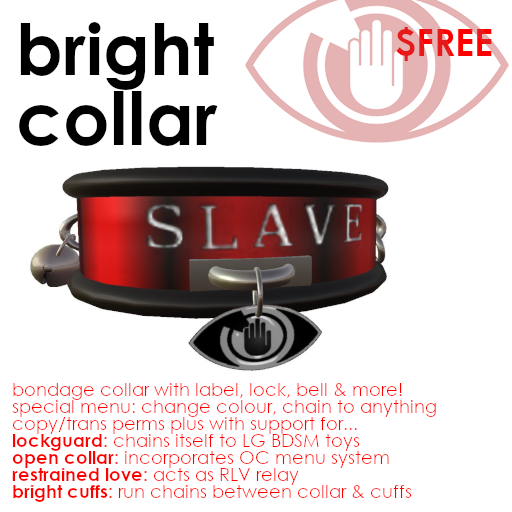
Free BDSM collar using Open Collar menus + RLV, Lockguard & LockMeister support
The Bright Collar is a proud symbol of BDSM sexuality. It identifies you as a lover of consensual power exchange, and a member of a vibrant community in both second and first lives.
Use the Bright Collar to animate or chain your own body, or offer control over it to others. Configure it to reflect your consent: to nothing and no one until asked, to ownership by a particular individual, or to any stranger who wishes to play with you.
Our company symbol, the Bright Eye, hangs from a tag from the front loop. Click this to choose the collar's colour, or chain any of its four loops to Bright Cuffs, or to nearby objects or avatars - even unscripted objects.
The Bright Collar supports four systems designed for Second Life BDSM lovers:
1. OPEN COLLAR: This superb, open source system was first developed by Nandana Singh in 2008, and is now used across Second Life. Click the body of the collar for the OC menu, to label the front of your collar, show or hide the collar's bell, set floating text over your head, and much more. Or choose an owner to whom these controls should be given, or even lock the collar, such that a padlock appears which you can no longer remove without "running away". For more information, visit https://opencollar.cc/
2. RESTRAINED LOVE VIEWER: Marine Kelley developed this extraordinary alternative to the Second Life viewer. RLV allows scripted BDSM devices to manipulate your avatar, and limit your own control. "RLV support" has now been added to many other third party viewers. If you enable it, the Bright Collar can act as an "RLV relay", allowing (for instance) a BDSM toy on which you "sit" to disable the "Stand Up" control, leaving you helpless until released by another. But this barely scratches the surface: you can find out more about RLV at http://realrestraint.blogspot.com
3. LOCKGUARD CHAINS: Developed by Lillani Lowell, BDSM toys with LockGuard support on which you sit will chain themselves automatically to LockGuard enabled collars or cuffs. The system is hugely popular, and many if not most Second Life BDSM toys and cuffs support it. For some reason, few collars support LG, and so few toys request collar chains: but the Bright Collar does, and will support any toy seeking to chains you by your neck.
4. BRIGHT CUFFS: Bright Cuffs are available through the same sources as the Bright Collar: including the Bright Adultshop, and the Bright shop in the Second Life Marketplace. When clicked, they display menus similar to that available through the Bright Eye described above. Use the menu to choose a new colour (which will be applied to the collar and all the cuffs you are wearing), or to run chains between any pair of cuffs and collar loops.
The Bright Collar is free, copyable, and transferable. Wear it yourself, or keep it in your inventory to give to any submissive you consents to your control. Be Safe, Sane, Consensual. And be proud.
Find the "Bright Collar boxed" object in your Inventory and drag it to the ground to rez it. Right-click the box, click "Open...", and click "Copy To Inventory".
This will create a folder called "Bright Collar boxed" in your Inventory: and inside, you will find the a "Bright Collar" object. Right-click it, and click "Wear".
(If you are using the Restrained Love viewer, you may find "Wear" has been disabled, to prevent you using it to displace other attachments. In this case, you must click "Attach to", and attach it to your chest.)
Depending on the size of your avatar, the collar may not be perfectly positioned around your neck. Right-click it, and click "Edit...". Red, green and blue arrows will appear: drag these to move the collar into the right position. If it needs to be rotated, hold down your Control key and three circles will appear: drag these to turn the collar. Finally, if it is too large or too small, hold down your Control and Shift keys together, and six little white cubes will appear around the collar: drag these to make it larger or smaller.
When it is positioned and sized appropriately, right-click it and click "Detach", and then put it on again. This will cause Second Life to "remember" where you wore it, so you need not position it again.
A tag showing the Bright Eye symbol hangs from the front loop of your collar. Click the eye to access the following menu:
    Click [COLOUR] to choose a colour,
    or choose from where to run or remove a chain.

    [collar front] [COLOUR]
    [collar right] [collar back] [collar left]
To change the colour of your collar, click [COLOUR]. The following menu will appear.
    Please choose a colour.

    [black] [grey] [white]
    [red] [green] [blue]
    [cyan] [magenta] [yellow]
    [<BACK] [pink] [gold]
Click the colour of your choice. This colour will be also be applied to Bright Cuffs if you are wearing them.
When you "sit" on a BDSM toy, if it is LockGuard enabled, it will automatically try to chain itself to the appropriate parts of your body: your wrists, your ankles, your neck, or all of these. If you are wearing cuffs and a collar which are LockGuard compatible, chains will appear between them and the toy.
Most wrist and ankle cuffs respond to requests from LockGuard toys: but for some reason, few collars do. The Bright Collar, however, does. You need do nothing to use this feature: if you climb onto a BDSM toy which wishes to chain you by the neck, the Bright Collar will so chain you.
However, you may chain your Bright Collar to *any* object, whether or not it is a BDSM toy, or to another avatar, or (if you are wearing them) to Bright Cuffs on your wrists or ankles. Begin by clicking the Bright Eye tag as explained above:
    Click [COLOUR] to choose a colour,
    or choose from where to run or remove a chain.

    [collar front] [COLOUR]
    [collar right] [collar back] [collar left]
To run a chain from your collar to a cuff, or a nearby object or avatar, click the button corresponding to the loop to chain. For instance, clicking [collar front] to run a chain from the loop on the front of your collar. The following menu will appear:
    Click [COLOUR] to choose a colour,
    or choose to what you wish to chain your collar front.

    [collar right] [COLOUR] [<BACK]
    [right ankle] [collar back] [collar left]
    [left wrist] [right wrist] [left ankle]
    [AVATAR] [OBJECT] [NOTHING]
If you are wearing Bright Cuffs, click (say) [right ankle] to run a chain from the front loop of your collar to the cuff on your right ankle.
To chain your collar to a nearby object click [OBJECT], or an avatar click [AVATAR]. A menu of suitable objects or avatars will be displayed. You can run a chain to any object - even if it is unscripted, and even if it does not belong to you. The chain will run to the centre of the chosen object or avatar, and will not restrict your movement: it is purely a visual effect.
To simply remove a chain from the chosen loop, chain it to [NOTHING].
Please remember that you can only chain your collar to Bright Cuffs: other cuffs do not support this feature.
To display the Open Collar menu, click the body of your collar, or say "xx menu" in chat, where xx are the first two letters of your name. Or if you prefer to access your menu without being overheard, say "/1 xx menu" instead.
For instance, Philip Linden would need to say "ph menu", or "/1 ph menu".
If you wish to allow another avatar access to your collar, investigate "Access" in the OC menu. From here you can control who else can access the OC menu on your collar, and name one or more owners.
A few example commands follow. Again, "xx" below are the first two letters of your name:
    xx menu - show the main oc menu
    xx lock - lock the collar, show padlock
    xx unlock - unlock the collar, hide padlock

    xx menu label - show the label menu
    xx label on/off - show or hide the label on your collar
    xx label newlabel - change your label text

    xx menu bell - show the bell menu
    xx bell on/off - enable or disable the bell sound when you move
    xx bell show/hide - show or hide the bell on your collar

    xx menu titler - show the titler menu
    xx title on/off - display/hide a title over your head
    xx title newtitle - change your title to "newtitle"
But these are just a few of Open Collar's many options. For the latest documentation, visit https://opencollar.cc/ and select the User Guide.
A few points specific to using these menus with the Bright Collar are worth noting:
1. The label on the collar will read "SLAVE" when you first put it on. You can change the text, its colour, or its font using the OC menu.
2. The bell hanging from the right hoop on the collar can be shown or hidden from the OC menu.
3. If the collar is locked through the OC menu, the ring running through the loops on the left of the collar will be transformed into a padlock.
As the OC system can be used to allow others power over you, it offers a safeword. As the OC documentation explains, "This will lift all RLV restrictions, unpose and unleash you. It will also send your Owner a message to check for your well being."
The default safeword is "RED". Just say any of the following in chat:
    RED
    /1RED
    ((RED))
The Bright Collar will work happily in any Second Life viewer, but if you are a using Marine Kelley's popular "Restrained Love Viewer", or another viewer which is "RLV enabled", it can allow you - or more commonly, your top, Dom(me), or owner - to access further controls over your avatar.
To enable this, use the command "xx rlv on". To disable it - if you still have access to do so - "xx rlv off". If you have given control of your collar to another, you may only be able to escape RLV by using your safeword, as explained above.
If your viewer is RLV enabled, and you have switched on RLV through your collar, it acts as an "RLV relay", conveying commands from other avatars and RLV scripted devices directly to your viewer. These may animate you, make you stand or sit, dress you or undress you, or allow or deny you access to Second Life features like teleport, chat, or IMs.
RLV is a clever and complex system, and this barely touches its features. For more information, visit http://realrestraint.blogspot.com
* Wear Bright Cuffs! They are designed to match your collar, will automatically change colour when you change your collar's colour, and allow chains to be run between themselves and each other, or to and from the collar.
* Do check out the Open Collar and Restrained Love Viewer documentation. The Bright Collar brings together a lot of open source systems generously created by others, and we can't even begin to document it all here. There is so much you can do, and as Marine Kelley (RLV's creator) says herself: "...many users only use at most 10% of their features, missing most of the fun."
* BDSM is an emotionally powerful passion, much misunderstood, and practised in Second Life by lovers with differing levels of experience. Make sure that you and your partner understand that it should be Safe, Sane, and Consensual. Even in Second Life, we are only *physically* safe. Behind each avatar is a human being who is as emotionally vulnerable as they would be if you were with them in person. The environment is virtual, but you and they remain live human beings, and if the feelings you share are real enough to give pleasure, they are real enough to hurt.
Shan Bright
Chief Executive Officer