
We'd like to thank those who have posted pictures of, written articles about, and published reviews of our company and its products on the web, examples of which appear below.
(Please note that these articles have been cut and pasted directly from the originals: we didn't wish to edit them. The odd typo in the original has therefore survived.)
You can also find individual comments passed on to us or left in review of our products here.
(By Rain Rappaport: original review here.)
This store has so much stuff. The vehicles they sell are awesome, the textures used are very well done. Not cheap or crappy looking. The prices are great for those too. The teleporter's are neat, fun to use.
The furniture look nice, some are texture change which is really nice. The office set and such, great look, decent prices too. The art work looks great as well. That is what brought me to the store, and they look awesome. Same for the prices there too, decent prices, pretty cheap for good looking art.
The rentals they offer are priced really low, always a plus when tight on linden. They offer sandboxes too, which is great for needing prim space with building. When your home is primed out.
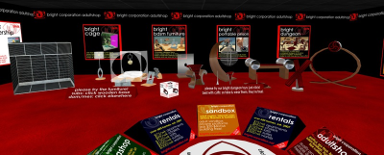
The adult store has a lot to offer as well. Well priced, looks great with textures and pretty decent prim wise too. The store is huge, they have so much stuff, furniture, tv's, cars, boats, teleporters, and tons of other gadgets. All decent prices, some things were a little pricey, but still worth buying.
The store offers demo's already rezzed out, so you can try a majority of their stuff. So much stuff there, could take forever to look around. The stores are low lag though, so taking time to shop is easy. Not crowded either, and very open spaces.
So it's easy to cam around as well, if your one who likes to cam shop. They have huge boards that are easy to spot, and click on for land marks to each thing they offer. Love the store, so much in one store, saves time when looking for something specific.
(By Imogen Blinker: original review here.)
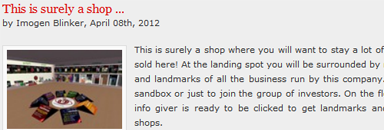
This is surely a shop where you will want to stay a lot of time to check the hundreds items sold here! At the landing spot you will be surrounded by many boxes giving you note cards and landmarks of all the business run by this company. Rentals, adult shop, mega shop, sandbox or just to join the group of investors. On the floor, just right under your feet, an info giver is ready to be clicked to get landmarks and give you information about the shops.
Around you a huge collections of ...everything (!) will immediately catch your eyes. On floor a lot of objects sold here and, on the walls, many boards giving you useful information about these ones. There is really everything you can ask, items for business, advertising boards, doors, rental guard, rental system, rental timer, what ever you can desire to run a rental business. Teleporters will take you to visit the amazing houses created and sold here, all modern and so well made, with many, many info about the product and how to use and place it.
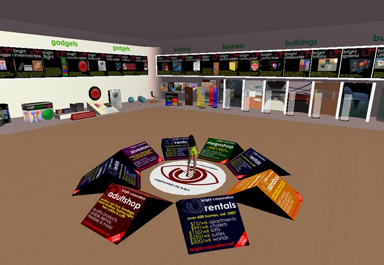
Then we have great pieces of ultra modern furniture, many flags and the art collection. Let me spend few words about this art....it's great! Every vendor has inside 24 art prints by an artist and you can choose between Bosch, Da Vinci, Gaugin, Klimt, Lautrec, Rousseau and Van Gogh, plus a great collection of landscapes. The price is very cheap but they will be a great add to your house! On the opposite wall you will find many vehicles, planes, boats and cars and then there are the gadgets.
These ones are useful little tools you can't live without you, between them a finder, a temp rezzer, a security system and even an inventory box to store, organize and back up your messy inventory, that can be placed in world or worn as a HUD! On the other walls many info and landmarks, a vendor to buy the items as gift and a free dealership to sell these great products directly from your home or shop earning 25% at every sale! Prices are fair compared to the high quality of these items and I am sure that all of you will find here something that fits your needs! Teleport now at bright Corporation and improve and make easier your Second Life experience!
(By FeralSkye Resident: original review here.)
In a word is brilliance.Shan Bright has taken unique and molded it into a line of products that rivals some of the "real" worlds best innovators. Even though I have only been in Second Life a few months, I have already come across several of these wonderful items Bright Corp.offers myself. Chances are, you have also.
If you are an established business owner,if you are just starting a new business,if you are remodeling a home,or if you are looking for a home,this is a place you simply must consider as your first stop for whatever your needs may be. Everything, from the building platform you are going to use, be it a business or a home, can be found here.There is a selection of prefab structures, completely ready to rezz and begin using, available.They can be modified to fit your particular usage.
Bright Corp. doesn't stop there though. Furniture,many items prepackaged for the particular needs ,and many of these at only one prim,are right here. And, that is not all that Bright Corp. has for you. Everything you can possibly think of as a must have for your project,and quite a few you probably hadn't thought of,are readily available.All are easy to use,simple is still the first and best consideration for a start up.
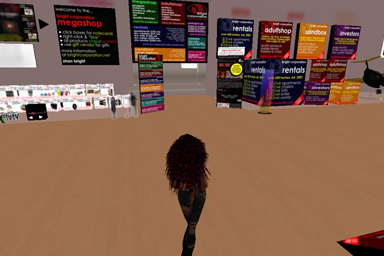
Some of the items you may want include, Teleporters,Security Systems,Landmark and Notice givers,Intercoms, and can you believe it..a nifty item that allows to temporarily rezz items without it impacting on your lands prim allowance?
At Bright Corp. you will also find a large selection of items that will make your SL experience enjoyable, and will also make your friends compliment you on how awesome you are for having found such incredibly useful products. Avatar items such as chat huds,inventory boxes,AO,Flight Simulators, etc.
And do not forget o check out the selection of free products you can try out.Once you experience firsthand the ease of use, you will find choosing Bright Corp.as your best option for providing all your personal, home and business needs an easy choice!
(By Mar: original review here.)
I’ve been meaning to do a series about useful gadgets in Second Life for some time now, and since I’ve been spending a while doing some inventory-sorting and archiving today, I was making use of one really great freebie gadget, and thus the post series was born! These will all be freebies or very cheap items. Any pricier gadgets that I blog about will go onto my Ponderings blog (check the sidebar of this blog for a feed from there).
My first featured useful gadget is the Bright Packer. It’s a freebie, available from Bright Corporation (SLurl*) (Marketplace link) and it’s a script that you place into a prim containing items you want to sell/give away/archive. It enables you to unpack that box anywhere, without needing to rez it on the ground. This is really handy if you want to open an archive box to remove something from it, and you’re in a location that doesn’t allow rezzing, or you want people to be able to unpack a box in your store but you don’t permit rezzing there.
How does it work? Simple: it appends the words ‘(Wear to unpack)’ to the end of the box’s name, and you simply do that. Right-click it in inventory, select ‘Wear’ and it will immediately offer you a folder containing everything in it. And the best thing? You don’t even need to take it off again; it ‘unwears’ itself!
Hop behind the cut for a quick tutorial on how to use it.
First of all, create your prim and fill it with whatever you’re archiving/selling/giving away. Bright Packer suggests you make that prim Copy and No Modify, so that’s what I did with mine. No need to texture it:
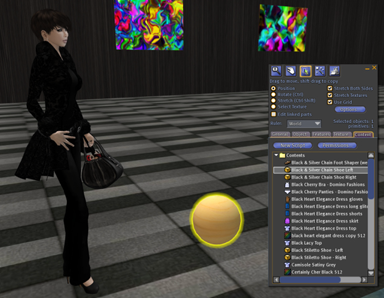
Next, add the Bright Packer script, highlighted here, to that prim:
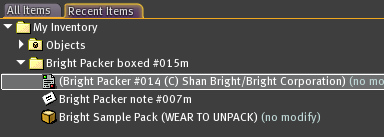
Your prim will suddenly have a load of hovering text above it, and that tells you exactly what to do. It’ll also have a nice rainbow moving texture on it:
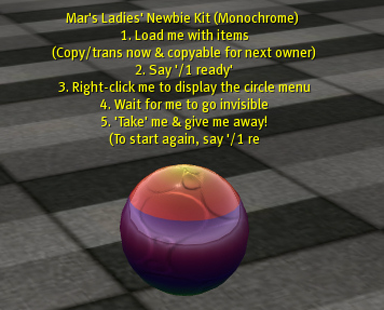
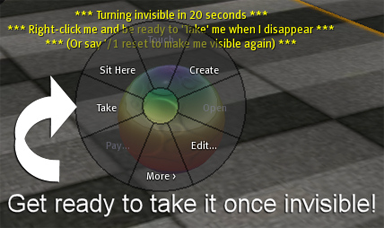
When you’re ready, just type /1 ready into chat, then right-click on the prim and be ready to click ‘Take’ from the pie menu (or the dropdown menu, if you’re using Viewer 2) when the prim turns invisible and you see the swirly lights. Be quick about this, and don’t tab away, or you might end up taking your house instead (what makes you think I mentioned that, hm? Yeah, Mar tabbed away to take the screenshot, and accidentally ‘took’ her skybox when she came back, instead of the prim!)
If you make a mistake and want to find it again, just say /1 reset in chat. It’ll become visible, ready for you to add more items, etc. Then just type /1 ready again.
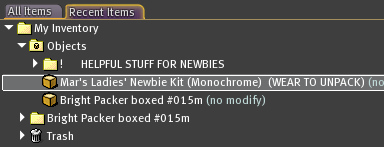
Look for it in your inventory, and you’ll see the ‘(Wear to unpack)’ appended to the prim’s name. If you then right-click that item and select ‘Wear’ you’ll be given a folder containing everything in the prim, and it will then delete itself from your person (which is why you should make it copyable, so you can wear it again, in case of mistakes) -
*Note: The Bright Corporation in-world store is at 2000m, so you’ll need a flight assist or flight feather to ensure you get there. If in doubt, it’s still absolutely free on SL Marketplace :)
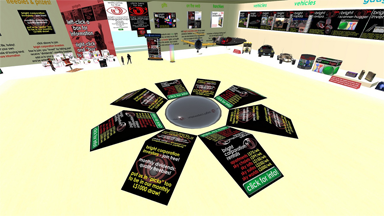
(By Torley Linden: original here.)
Bright Corporation Megashop: homes furniture gadgets art cars, Mizar (32, 44, 2001) - General
uses consistent sans serif typeface/font
(Yes, Torley took this picture, flickrd it, and that's the entire accompanying text. What can we say? The man clearly loves his fonts. Well, we think your typeface is cute too, Torley :))
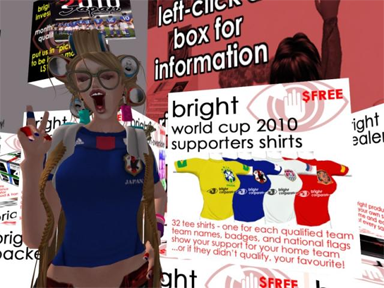
(By Kenji Huldschinsky: original review here.)
Prize: Bright World Cup 2010 supporters shirts boxed #001 0L$
Supporters shirts for all 32 national teams qualified for the football 2010 World Cup with names, badges & flags (copy)
* Creator Name: Shan Bright
* Contents: Shirt Layer Only Enclosure :)
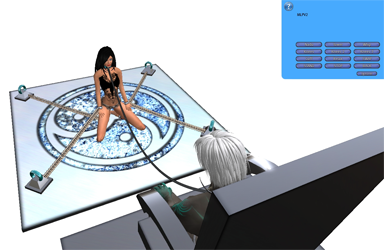
(By Teq Hutchinson: original review here.)
GOAL:
Create a multi-animations object and generate automatically chains often used in bdsm to attach an avatar to it.
WHAT YOU WILL NEED:
1. Know how the MLPV2 works (see MLPV2_Tutorial).
2. MLPV2 scripts made by Learjeff Innis (available inworld here: jPose IslandD).
3. MLPV2 Give Item Add-on made by Chaz Longstaff (available in the wiki here: MLPV2_Give_Item_Add-on).
4. CISS, the Cuff Integrated Support System made by Shan Bright & Innula Zenovka (available inworld here: Bright Corporation AdultshopD).
5. Optional: install the Restrained Life viewer (can be downloaded here: http://www.erestraint.com/realrestraint/ ).
(Note: I have choosen MLPV2 and CISS because they are free and opensource).
STEP 1:
All your custommers won't already have a collar and cuffs, so we will create a button on the blue menu that when clicked will deliver them.
1. Drop the ~Give script (MLPV2 Give Item Add-on) in the content of the prim where your MLPV2 scripts are.
2. Rezz inworld the CISS collar and cuffs (Bright Collar #022 - Bright Cuffs left wrist #009 - Bright Cuffs right wrist #009 - Bright Cuffs left ankle #009 - and Bright Cuffs right ankle #009).
3. Right clic on each of these objects and choose "edit" - delete the ""#"" in the name of each. You have to do this because the "#" is the separator used by the ~Give script
4. Once done, take them back to your inventory, and drop them in the content of the prim where your MLPV2 scripts are.
5. Add to the menu in an MLPV2 menu notecard the following line:
LINKMSG Wear Cuffs | 1,-4,987789,Bright Collar 022#Bright Cuffs left ankle 009#Bright Cuffs left wrist 009#Bright Cuffs right ankle 009#Bright Cuffs right wrist 009##Wear these collar and four cuffs and chains will appear
A new button "Wear Cuffs" will now be shown in your MLPV2 menu, and when clicked your custommers will receive the collar and cuffs.
STEP 2:
Now we will dropp the required CISS scripts into your object.
1. Find the "CISS main script" in your inventory and drop it in the content of the prim where your MLPV2 scripts are.
2. Find the "CISS sit script" in your inventory and drop it in the content of the pose ball rezzed by the MLPV2 (~ball).
STEP 3:
Now we will create the four anchors where the avatar wearing the cuffs will be attached.
1. Create four prims (little torus for example), give to each a different name (for example "anchor1" "anchor2" "anchor3" and "anchor4") and link them to the prim where your MLPV2 scripts are. You don't have to drop any script into these prims, only their names are important.
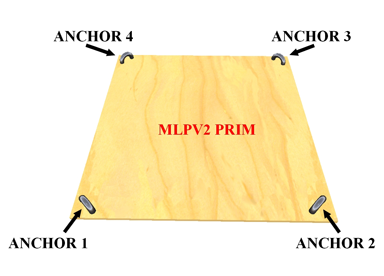
2. In the content of the prim where your MLPV2 scripts are, open the "CISS main script", and find the line beginning by "list animations = ["
3. Now you will have to say to the script, for each animation that you will use, wich part of the avatar you want to be attached, and where:
list animations = [
"Animation_number_1", "leftwrist,anchor1,rightwrist,anchor2,leftankle,anchor3,rightankle,anchor4",
"Animation_number_2", "leftankle,anchor1,rightankle,anchor2"
];
In this example, when playing the Animation_number_1, the avatar will have the left wrist attached to the prim you have previously named "anchor1", the right wrist to the anchor2, the left ankle to the anchor3, and the right ankle to the anchor4.
When playing the Animation_number_2, the avatar will only have his ankles attached to anchors 1 and 2.
Once you have defined all your animations you can save the "CISS main script" and close it. If you have made a mistake just re-open it. Your system is ready to use.
Note: Animation names are translated to UUID, and a simple renaming of an animation does not change the UUID, so differently named copies of a defined animation within the linkset will behave identically. Uploading an original animation with a new name will work around this.
STEP 4 - OPTIONAL:
If the avatar you want to be attached on your object is connected with the Restrained Life viewer, and if you are the owner of his collar, you can force him to sit on your MLPV2 object.
Do a left clic on his collar, or type in the chat windows "*menu" - this will open a blue dialog boxe with the options of the collar.
Select "RLV", then "Sit", then "SitNow", and choose the matching pose ball in the menu. This will force the avatar to sit on it. If you have previously selected "RLV">"Sit">"Forbid Stand" the avatar won't be able to leave the pose ball by himself.
Thanks to Learjeff Innis, Shan Bright, and Innula Zenovka for their wonderful work.

(By Trace17 Junkers: original review here.)
I am sure the most of you are already using AO's (animation overrite) but while browsing in Xstreet SL I found a pretty cool one, which I wanted to show you. For free!
The AO is called 'Bright AO', created by Shan Bright. It have everything you will need and even more. Facial expression and emotions included. You can change all animations and put your own ones in it. So it is fully costomizable. Please read the description at Xstreet SL to get all informations.
Comments:
I've used this AO, and also lots of Shan's great things in here HQ store! She builds great things, and is such a sweetie to meet! She build the skyhouse Guy and i used to have, and lots of other things I use in my inventory...i highly recommend her shop!
Ellbee Allen